
Building a Sales Intelligence Pipeline: From Raw Data to OLTP ETL to Data Insights
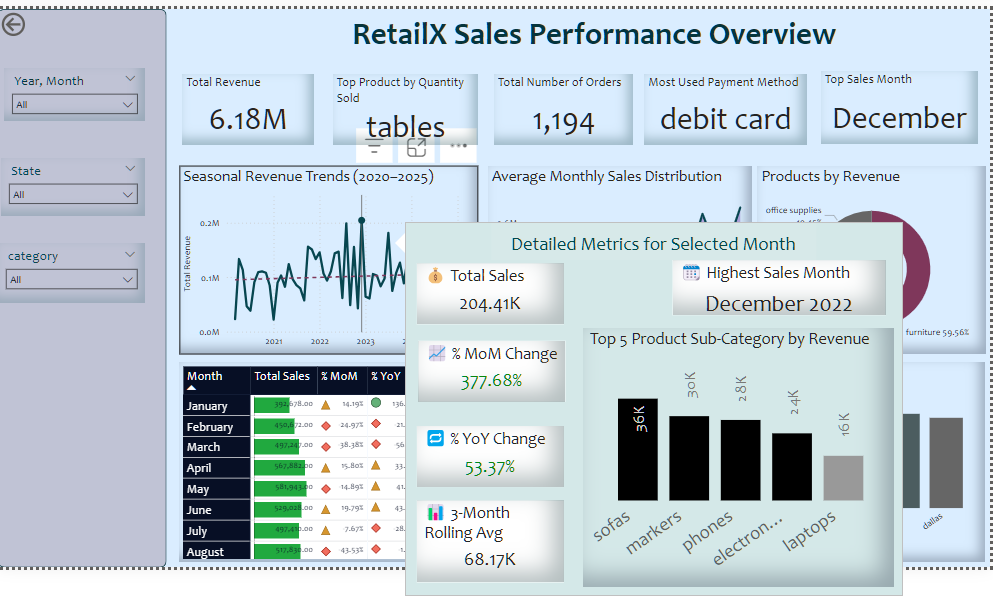
This project documents a complete data workflow for RetailX — from structured ETL design to insight generation:
🔧 ETL & OLTP Design
This project began by ingesting raw sales data and transforming it into a structured format. Below is a snippet of how data cleaning was performed using pandas:
- Data cleaning and preprocessing using pandas
```python
import pandas as pd

df = pd.read_csv("sales_dataset.csv")
df.columns = df.columns.str.strip().str.lower().str.replace(" ", "_")
df["order_date"] = pd.to_datetime(df["order_date"], errors="coerce")
df = df.drop_duplicates().dropna(subset=["order_id", "order_date"])
df["cost"] = df["amount"] - df["profit"]
```
- Postgresql table creation and secure data loading using psycopg2
Next, I connected to Postgresql and created the OLTP schema skipping 3NF (Assumption:Table is normlised):
- Validation of load and schema integrity
📊 Sales Analysis
With the cleaned data loaded into Postgresql, I explored:
- Top-Selling Products: Tables lead in quantity; Markers in revenue
**Example: Top 5 selling products by quantity**
```sql
SELECT sub_category, SUM(quantity) AS total_quantity
FROM retailx_oltp.orders
GROUP BY sub_category
ORDER BY total_quantity DESC
LIMIT 5;
```
- Regional Insights: High sales from New York, Florida, and California; Orlando leads city-wise
- Customer Value: High spenders like Cory Evans and recurring buyers like Scott Lewis
- Seasonal Trends: Revenue peaks in May and December, with December 2022 hitting £204,413
- Payment Patterns: Debit Card is the most used payment method
This project demonstrates a comprehensive end-to-end data pipeline tailored for retail sales intelligence. It covers the full lifecycle from raw CSV ingestion, data cleaning, to structured loading in Postgresql. The process culminates in a suite of analytical queries and visualisations designed to extract actionable insights.
By combining data engineering best practices with business-focused analysis, the notebook serves as a blueprint for building scalable, insight-driven workflows. It is especially valuable for data engineers, analysts, and BI practitioners aiming to bridge the gap between backend data modelling and front-end decision support.
Restoring the Postgresql Database from a `.backup` File
To restore the `.backup` file (custom format), ensure:

- PostgreSQL is installed and running
- The `pg_restore` tool is available in your terminal
- You know the PostgreSQL username (postgres) and have appropriate access

```bash
pg_restore -U your_user -C -d postgres retailx_backup_2024_04_17.backup